
. .

Thread: Emco PC120 Turn

Hybrid View

Previous Post Previous Post   Next Post Next Post
  1. #1
    Chaz's Avatar
    Lives in Ickenham, West London, United Kingdom. Last Activity: 26-08-2025 Has a total post count of 1,654. Received thanks 115 times, giving thanks to others 71 times.
    Ok, based on this, my X is upside down?
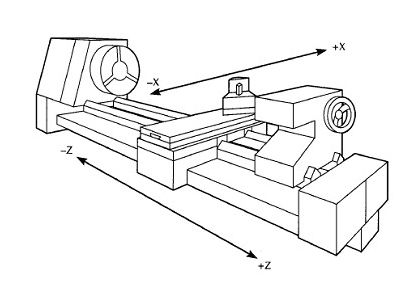

    The turret sits on the top. So it should be showing +36, not -36 (relative to the zero line)?

  2. #2
    Chaz's Avatar
    Lives in Ickenham, West London, United Kingdom. Last Activity: 26-08-2025 Has a total post count of 1,654. Received thanks 115 times, giving thanks to others 71 times.
    Ok. Some progress. Firstly, if something has 'professionally' been converted. Check everything.

    X was upside down.
    Steps were wrong. Explains why some circles too big and some too small.

    Still having a lesser issue. I should end up with a 10mm profile but the G Code is not making that happen. The left over sizes are too large. I suspect its something on the Fusion tooling side, its as if its adding in some additional size somewhere. There is nowhere below where I can get a 10mm and 5mm profile. The closes to zero the X goes is X7.729.

    N25 G98
    N26 G97 S4000 M3
    N27 G0 X17. Z1.347
    N28 X12.971
    N29 G1 X12.828 F250.
    N30 X10. Z-0.067
    N31 Z-4.185
    N32 G18 G3 X10.981 Z-4.541 R1.794
    N33 G1 X13.809 Z-3.127
    N34 G0 Z1.404
    N35 X11.828
    N36 G1 X9. Z-0.01 F250.
    N37 Z-4.024
    N38 G3 X10.5 Z-4.335 R1.794
    N39 G1 X13.328 Z-2.921
    N40 G0 Z1.404
    N41 X10.828
    N42 G1 X8. Z-0.01 F250.
    N43 Z-4.
    N44 X8.413
    N45 G3 X9.5 Z-4.084 R1.794
    N46 G1 X12.328 Z-2.67
    N47 G0 Z1.404
    N48 X10.279
    N49 G1 X7.45 Z-0.01 F250.
    N50 Z-4.
    N51 X8.413
    N52 X8.456
    N53 X8.5 Z-4.001
    N54 X11.328 Z-2.586
    N55 G0 Z1.404
    N56 X9.729
    N57 G1 X6.901 Z-0.01 F250.
    N58 Z-4.
    N59 X7.95
    N60 X10.779 Z-2.586
    N61 G0 Z0.62
    N62 X7.729
    N63 G1 X4.901 Z-0.794 F250.
    N64 Z-5.
    N65 X8.413
    N66 G3 X10. Z-5.794 R0.794
    N67 G1 Z-8.544
    N68 X12.828 Z-7.13
    N69 X14.
    N70 G0 X17.

  3. #3
    Chaz's Avatar
    Lives in Ickenham, West London, United Kingdom. Last Activity: 26-08-2025 Has a total post count of 1,654. Received thanks 115 times, giving thanks to others 71 times.
    OK, sorted I believe. Changed from Radius to Diameter mode. Parts are now basically the right size.

  4. #4
    m_c's Avatar
    Lives in East Lothian, United Kingdom. Last Activity: 3 Days Ago Forum Superstar, has done so much to help others, they deserve a medal. Has a total post count of 2,992. Received thanks 376 times, giving thanks to others 9 times.
    On a lathe X should always move to positive as the tool moves away from centre.
    Even on a lathe with twin turrets, the controller should be smart enough to know what direction is positive depending on what tool/turret is selected, although I think there is a bug in Mach3 when running front and rear turrets.

    G0 is just a rapid move.
    G53 defines machine coordinates, but it's non-modal I.e. you have to put G53 in front of every coordinate to move to machine coordinates, other wise it will default to the active tool/offset coordinates. You would typically use a G53 for the tool change location move.
    Avoiding the rubbish customer service from AluminiumWarehouse since July '13.

  5. #5
    m_c's Avatar
    Lives in East Lothian, United Kingdom. Last Activity: 3 Days Ago Forum Superstar, has done so much to help others, they deserve a medal. Has a total post count of 2,992. Received thanks 376 times, giving thanks to others 9 times.
    And pick either diameter or radius mode. Don't keep switching between them, as that's when you're far more likely to make a mistake.
    Avoiding the rubbish customer service from AluminiumWarehouse since July '13.

  6. #6
    Chaz's Avatar
    Lives in Ickenham, West London, United Kingdom. Last Activity: 26-08-2025 Has a total post count of 1,654. Received thanks 115 times, giving thanks to others 71 times.
    Quote Originally Posted by m_c View Post
    On a lathe X should always move to positive as the tool moves away from centre.
    Even on a lathe with twin turrets, the controller should be smart enough to know what direction is positive depending on what tool/turret is selected, although I think there is a bug in Mach3 when running front and rear turrets.

    G0 is just a rapid move.
    G53 defines machine coordinates, but it's non-modal I.e. you have to put G53 in front of every coordinate to move to machine coordinates, other wise it will default to the active tool/offset coordinates. You would typically use a G53 for the tool change location move.
    Thanks. It's working now. I reversed X.

  7. #7
    Chaz's Avatar
    Lives in Ickenham, West London, United Kingdom. Last Activity: 26-08-2025 Has a total post count of 1,654. Received thanks 115 times, giving thanks to others 71 times.
    Can anyone help with some G Code in the toolchange Macro please?

    Mine doesnt move the turret out the way but needs to. Ideally Id like to move it to the Machine 0 position.

    I found the original tool change macro that was used on my machine which contains these movement commands however the movement is not consistent (ie different directions depending on where it is, I'm not sure why).

    Code "G01 x-10 F1300"
    Code "G0 z-10"

    I tried to do G53, cant do this in MachTurn.

    I then tried G28 which works however it also tries to 'home' my turret rotation axis, which is not correct.

    How do I simply tell the machine 'go home on the X and Z axis (only and ignore A Axis)'?

    Thanks


  8. #8
    m_c's Avatar
    Lives in East Lothian, United Kingdom. Last Activity: 3 Days Ago Forum Superstar, has done so much to help others, they deserve a medal. Has a total post count of 2,992. Received thanks 376 times, giving thanks to others 9 times.
    I've used G53 in turn, but never in a macro.

    I always do the tool change position move in G-code, as it gives you more flexibility, and allows you to cut down on wasted travel.
    Avoiding the rubbish customer service from AluminiumWarehouse since July '13.

  9. #9
    Chaz's Avatar
    Lives in Ickenham, West London, United Kingdom. Last Activity: 26-08-2025 Has a total post count of 1,654. Received thanks 115 times, giving thanks to others 71 times.
    Quote Originally Posted by m_c View Post
    I've used G53 in turn, but never in a macro.

    I always do the tool change position move in G-code, as it gives you more flexibility, and allows you to cut down on wasted travel.
    Thanks. So you edit your G Code to 'manually' move the turret? Problem is, G53 doesnt work in Turn for me. Tells me its not supported.

    How else could I tell the machine to go to (machine) home on X and Y only?

Thread Information

Users Browsing this Thread

There are currently 1 users browsing this thread. (0 members and 1 guests)

Similar Threads

  1. Mach Turn
    By Kai in forum CAD & CAM Software
    Replies: 5
    Last Post: 02-08-2016, 02:40 PM
  2. Denford Star Turn 3
    By MarkBrown in forum Workshop & Equipment
    Replies: 2
    Last Post: 02-12-2014, 10:57 PM
  3. Getting the stepper to turn
    By thorphar in forum General Electronics
    Replies: 0
    Last Post: 16-09-2014, 07:48 PM
  4. 11 hours of trying to get the motors to turn, help please
    By Wotsit in forum Stepper & Servo Motors
    Replies: 19
    Last Post: 05-02-2013, 03:07 AM
  5. LED not turn on
    By Awel in forum Motor Drivers & Controllers
    Replies: 1
    Last Post: 06-12-2011, 06:59 AM

Bookmarks

Posting Permissions

  • You may not post new threads
  • You may not post replies
  • You may not post attachments
  • You may not edit your posts
  •