

-
04-03-2011 #1

 Last Activity: 26-04-2011


Hi....
So I decided to try and mill a sphere as a test piece to check the functioning of my mill and the software I'm using. I figured a sphere would be tough - and I turned out to be correct.
I'm using Vectric Cut3D to produce the toolpath and Mach3 to control the mill.
I used a piece of pine 70mmx70mmx43mm and aimed for a sphere 40mm in diameter.
However, it became very obvious on the 2nd pass that the circles being left after each pass were not concentric. I could see clearly that when Mach3 said the X-axis was at 70mm it was in fact probably 75mm!! It seems as though Mach3 no longer knew where the exact position of the mill was. I shut the mill off when it became apparent that the Z-axis had suffered the same fate.
Here's the piece after about 12 roughing passes.
It's a mess:
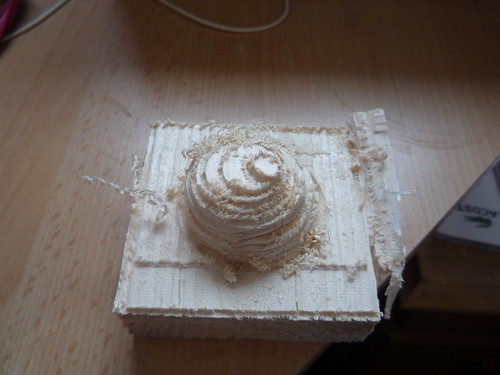
Does anyone have any ideas why this may have occurred and possible solutions please?
Is this backlash at work?
Regards
SimonLast edited by Lee Roberts; 04-03-2011 at 06:22 PM. Reason: Added photo.
-
04-03-2011 #2
 Last Activity: 24-03-2022

HOLY S**T!!!!:rofl:
dont you just hate it when that happens!
looks like the mountain off close encouters :)
looks like a shitload of lost stepps to me
id zero your tool and DRO's in mach on a point rapid XYandZ back and forth for a spell and get mach to go back to zero
im gussing it will stop miles away from your refrence point, if it dose you need to back off your rapid speed in motor tuning
going off what you are saying, if its reading +70 on the X axis and is more like +75 then your losing stepps when the X axis is moving in the minus direction, it maybe during a rapid or during a cut (cant tell without seeing the tool path)
what ever it is you need to lower friction on your X axis or stop driving your X stepper so hardLast edited by blackburn mark; 04-03-2011 at 02:14 PM.
-
04-03-2011 #3
Last Activity: 26-04-2011
Ok... thanks for that..... I'll try that right now....!!
And yes... it's the worst example of a sphere I've ever seen.... mind you it's first attempt at anything on the mill.....
-
04-03-2011 #4
Last Activity: 11-01-2024
Looks more like lost steps to me. Backlash would have the circles concentric but not circular.
You could try it at a lower feed rate to see if it's lack of power in the steppers.
A more scientific test is to put a dial gauge against the axis, creep up to a sensible setting and then rapid traverse away from it then come back to the same position at a low feed rate. The dial gauge should have the same reading.
If it's happening on all axes with no pattern it might be noise or if it's happening when doing moves on all axes it might be the power supply struggling.
Have you tuned the top speed and acceleration settings of Mach3? What are you using for steppers / drivers / power supply and what feed rates were you using?
-
04-03-2011 #5
Last Activity: 24-03-2022
all part and parcel of building a cnc in my opinion, i think we have all had our share of disasters but yours has really tickled me, i actualy laughed out loud when i saw that picture.... it reminds me that im not alone on the planet
 Originally Posted by Minnican

it looks like it will be a pretty simple fix with a bit of messing about in motor tuning
let us know if you manage to carve anymore square spheres :)
-
04-03-2011 #6
Last Activity: 26-04-2011
Ok..... suggestions thick and fast...... I like it.
Right, after zeroing and whizzing around on all axis.... the DRO's no longer correspond with the home. X=-1.3675mm; Y=-0.5475 and Z=+1.9063, all approximate figures.
I looked at the setup of the motors and see: X-axis "steps per"= 800; "velocity"= 1500; "acceleration"=200; "step pulse"= 5; "dir pulse"=3
Y-axis "steps per"= 800; "velocity"= 1500; "acceleration"=200; "step pulse"= 5; "dir pulse"=3
Z-axis "steps per"= 800; "velocity"= 700.2; "acceleration"=100; "step pulse"= 5; "dir pulse"=3
Velocity and acceleration in the above is mm.
The stepper motors are 57BYGH488 1.8 degrees and 2.5A. Can't really answer regarding drivers and power supply as I'm not sure where to find this info.
Yep..... the photo's certainly worthy of a giggle...... I did..... after the cursing!!!
-
04-03-2011 #7
Last Activity: 26-04-2011
Oh.... and feed rate box on mach3 reads:
FRO=6.00
F=6.00
100%
units/min=0.00
units/rev=0.00
I have no idea what any of that means...!!!
-
04-03-2011 #8
Last Activity: 12-09-2011
I'm no expert but have you set up the machine correctly? It seems to me that the machine is moving further than it thinks. Double check that you have set the number of steps per linear measurement correctly. These may not all be identical by the way. What works for the X-Axis might not be right for the others etc.
Martin.
-
04-03-2011 #9
Last Activity: 24-03-2022
1500 sounds a bit quick for a mill using 2.5A steppers
id leave the other settings for now and work on the velocity
i would have though below 800 on all and try again
if it works well up them bit by bit and visa versa
-
04-03-2011 #10
Last Activity: 26-04-2011
ok..... i'll adjust the X and Y to 800 and rerun the sphere. I presume I need to lower the Z from 700 as this is losing steps too.....?

 Reply With Quote
Thread Information
Users Browsing this Thread
There are currently 1 users browsing this thread. (0 members and 1 guests)
Similar Threads
-
Micro lathe Zero backlash* conversion
By Jonathan in forum Lathes, Lathe Rebuilding & ConversionsReplies: 14Last Post: 22-09-2012, 10:56 PM -
backlash mack3
By h4ppy-chris in forum General DiscussionReplies: 9Last Post: 29-01-2011, 01:11 PM -
Sieg X3 backlash...
By Vikash in forum General DiscussionReplies: 0Last Post: 20-10-2010, 02:51 PM -
Positive backlash???
By fasteddy in forum Gantry/Router Machines & BuildingReplies: 3Last Post: 18-08-2010, 05:04 PM -
Sieg C3 backlash problem
By Cret in forum Milling Machines, Builds & ConversionsReplies: 10Last Post: 08-09-2009, 07:18 AM

Bookmarks